git-qaHUMAN-IN-THE-LOOP QA
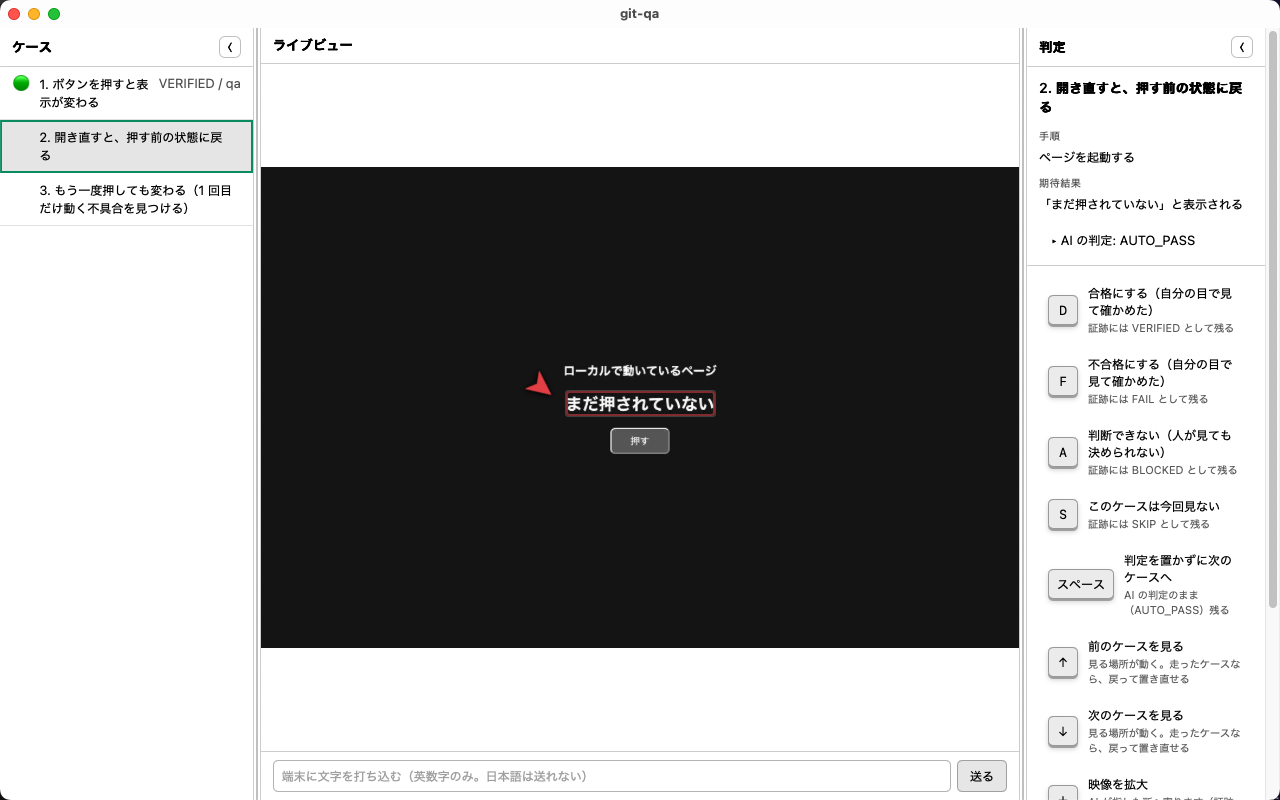
The AI drives. You watch, and sign off each case with one key. git-qa is an open-source human-in-the-loop QA runner. It works through a test sheet (TSV) on Android devices, web pages and desktop apps — and iPhone / iPad.
The AI never passes anything. The most it can give is AUTO_PASS —
nobody looked. "A person verified this" appears only when a person presses the key.
Download
Builds are published on GitHub Releases.
.dmg and drag it into Applications. Drives devices, web pages and
desktop apps.
Get the .dmg
.msi. Drives
web pages, Android devices and desktop apps (recording and some input fields are not on Windows yet).
Get the .msi
macOS builds are signed and notarized, so they open as they are.
What you need first
Node is required. The app starts a runner process; without Node it stops on start and says why.
| Node 22 or newer | Required. Without it the app stops after launch |
|---|---|
| adb (Android SDK Platform Tools) | Only for Android devices |
| Chrome / Edge / Firefox / Safari | Only for web pages. Pick any one that is installed (its version goes into the evidence) |
| ffmpeg / cwebp |
Optional. Nothing stops without them, but evidence images and video stay in the
format they were captured in (.jpg / .mov)
|
First three steps
- Enter a handle It goes into the evidence as "who looked". Use a handle, not your real name — evidence is designed to be committed to public repositories.
- Pick what to look at An Android device, a web page URL, or a desktop app by name (the owner of the window).
-
Pick a test sheet (TSV) and start
The AI runs one case at a time and stops when it is your turn. D pass
/ F fail / A cannot decide / S skip. Moving on with
Space without a verdict leaves
AUTO_PASS(it is never promoted to a pass).
Watch mode
It moves on without you. You only watch; the AI runs to the end.
| If you press a key | That becomes the verdict (recorded as the verdict of the person watching) |
|---|---|
| If you do not | AUTO_PASS. Never promoted |
| To stop | Esc, or [Stop watching] on screen. Cases that have not run are not written into the evidence (you can continue from there next time) |
One test, one folder
The test sheet, the evidence, the screens and the video pile up in one place. Put the whole folder under git.
$ pnpm ws:init ./contacts-check "Contacts check"

contacts-check/
  git-qa.json     … marks this folder as one test
  sheet.tsv       … the test sheet (you put it here)
  runs/           … created when you run
    20260912-100000/
      run.json
      case-001/screen.webp · screen.webm
Without the marker, nothing changes (runs go to runs/ where you ran it).
Stop today, continue tomorrow
Stopped runs are listed on the start screen. Pick one and git-qa adds to that run — you do not place yesterday's verdicts again.
| Cases that never ran | Not written into the evidence. Writing "stopped, so cannot decide" would make them indistinguishable from cases that ran and ended undecided |
|---|---|
| Is it unfinished? |
If run.json has no end time, it is unfinished. That is the marker
|
| If the sheet changed | It does not continue. Yesterday's verdicts were placed against a different text |
What is kept
runs/<date-time>/
  run.json        … verdicts, steps, who placed them and when (written after every case)
  case-001/
    screen.webp   … the screen at the moment the verdict was placed
    screen.webm   … video while the AI drives (in watch mode)
Nothing about your machine goes in. The sheet's path is kept relative to the workspace, so the same run reads the same way on anyone's machine (no personal names in the evidence).
You can check later what each verdict was placed against.
If the sheet has been rewritten, pnpm check:run exits with 1.
$ pnpm check:run runs/<date-time>/run.jsonWhat it can do today
| Android devices | Real devices and emulators over USB. Tap, swipe, type |
|---|---|
| Web pages | Chrome-family / Firefox / Safari. Same viewport every run, so you can compare layouts |
| Desktop apps | macOS and Windows. On macOS it presses without bringing the app to the front and reads text in two stages (Accessibility, then OCR). On Windows it reads and presses through UI Automation (no recording) |
| iPhone / iPad | Watch, read and record over USB. Tapping, typing and launching apps only with WebDriverAgent installed on the device (signing and installing it is a person's job). Not yet confirmed from Windows |
| From an AI agent | Over MCP (take screenshots, read the screen, tap) |
Not there yet
| Recording on Windows | Desktop testing itself works (find the window, capture, read text, press, type, keys). Only recording is missing — a screen is kept per case |
|---|---|
| Some input fields on Windows | Typing works, but the contents of password fields are not read (even where they could be — that is a decision) |
| Signing on Windows | Not signed (the certificate needs a physical token or an HSM), so you will see the warning above. macOS is signed and notarized |
| Auto-update | None. Download new builds from this page again |
| Detecting that the target was swapped | Desktop apps only. Web and Android are recorded as "could not measure" (never as "unchanged") |
Read the source, run it locally
You can also clone and run it instead of downloading (development happens here).
git clone https://github.com/meta-taro/git-qa.git
cd git-qa
pnpm install
pnpm app